How and When to Compare BOMs

A Bill of Materials looks like a table, so comparing two BOMs seems like it should be straightforward: put them side-by-side, find the differences, done. In practice, electronics BOMs don't work that way. The structure of the data (particularly how reference designators encode component placement) means a naive row-by-row diff will miss changes, create false positives, and leave your engineers more confused than before they started.
Getting BOM comparison right requires understanding what the data actually represents.
The Reference Designator Challenge
In a generic spreadsheet diff, you compare row 3 in file A against row 3 in file B. Electronics BOMs can't be compared this way.
Consider a BOM row that reads C1, C2, C5, C8 for a 100nF 0402 capacitor. A design revision might change this to C1, C2, C5, C8, C11 (the same component, one additional placement). If you compare the rows as strings, they look different. But the meaningful change is not "this row changed"; it's "reference designator C11 was added." It now uses a different quantity as well.
The correct approach is to explode reference designators before comparison. Every designator from every row in both BOMs is extracted into a flat list, and then each individual designator is compared across the two BOMs. This way, you're asking the right question: for each placement location on the board, is the component the same, different, or missing entirely?
A BOM with 200 components listed across 40 rows might have 400 individual reference designators when fully expanded. The comparison operates on all 400, not on 40 rows.
Which Fields Actually Matter
Not every column in an electronics BOM is relevant to comparison. A comparison tool needs to be intentional about which fields it uses to determine whether two components are the same.
In electronics, some of the fields that define component equivalence are:
| Field | Why it matters |
|---|---|
| Part number | Identifies the component itself. A different part number means a different component, even if the description sounds the same. |
| Reference designators | Determine the actual quantity and placement. Two BOMs can list the same part number but assign it to different locations; that's a meaningful difference. |
| Quantity | Not all BOMs use reference designators. Mechanical parts, cables, and consumables are often listed with a plain numeric quantity; for these rows, quantity is the only measure of how much is needed. |
| DNP flag | "Do not populate" changes the actual board configuration. A component marked DNP is not installed, so a change to this flag is functionally significant even if the part number stays the same |
Fields like descriptions, manufacturer names, or supplier notes are informational. Changes to them don't alter the physical assembly. A good comparison focuses on the fields that define what gets built.
The Three Outcomes of a Comparison
Once designators are exploded and the relevant fields are defined, every reference designator in the comparison falls into one of three categories:
Equal: the designator exists in both BOMs, assigned to the same part number and DNP status. Nothing changed for this placement.
Different: the designator exists in both BOMs, but something changed: a different part number, a DNP flag that was added or removed, or a change in the component's properties. These are the cases that need engineering review before production.
Unique: the designator exists in only one of the two BOMs. A designator present in the new BOM but absent from the old one means a component was added. The reverse means one was removed.
When BOM Comparison Is Most Valuable
Comparing revisions of the same product is the most common use case. When an engineer updates a PCB layout and exports a new BOM, comparing it against the previous revision tells you exactly what changed: which components were added, removed, or replaced. This is essential for change control: you want a precise, auditable record of what's different between rev A and rev B before you approve the new revision for production.
Comparing BOMs from different products is less obvious but equally useful. If two product lines share a common sub-assembly or were derived from a common design, a BOM comparison can quickly identify shared components and highlight where they've diverged. This matters for procurement consolidation (shared components can be bought in larger volumes), for reuse opportunities in new designs, and for understanding compatibility between product variants.
Comparing One BOM Against Two Others Simultaneously
Some scenarios call for more than a pairwise comparison. When you're deciding whether a new board revision is closer to rev B or rev C of a reference design, or when you're evaluating which of two supplier-provided BOMs better matches your internal specification, you need to compare one BOM against two others at the same time.
In a three-way comparison, you select a base BOM and up to two comparison targets, and the tool produces a side-by-side view of all three. Each reference designator is classified independently against each target, so you can see at a glance where all three BOMs agree, where two of three diverge, and where a component is unique to one revision.
This three-way view is particularly useful during design reviews, where an engineer may be reconciling multiple versions of the same board before finalizing the released revision.
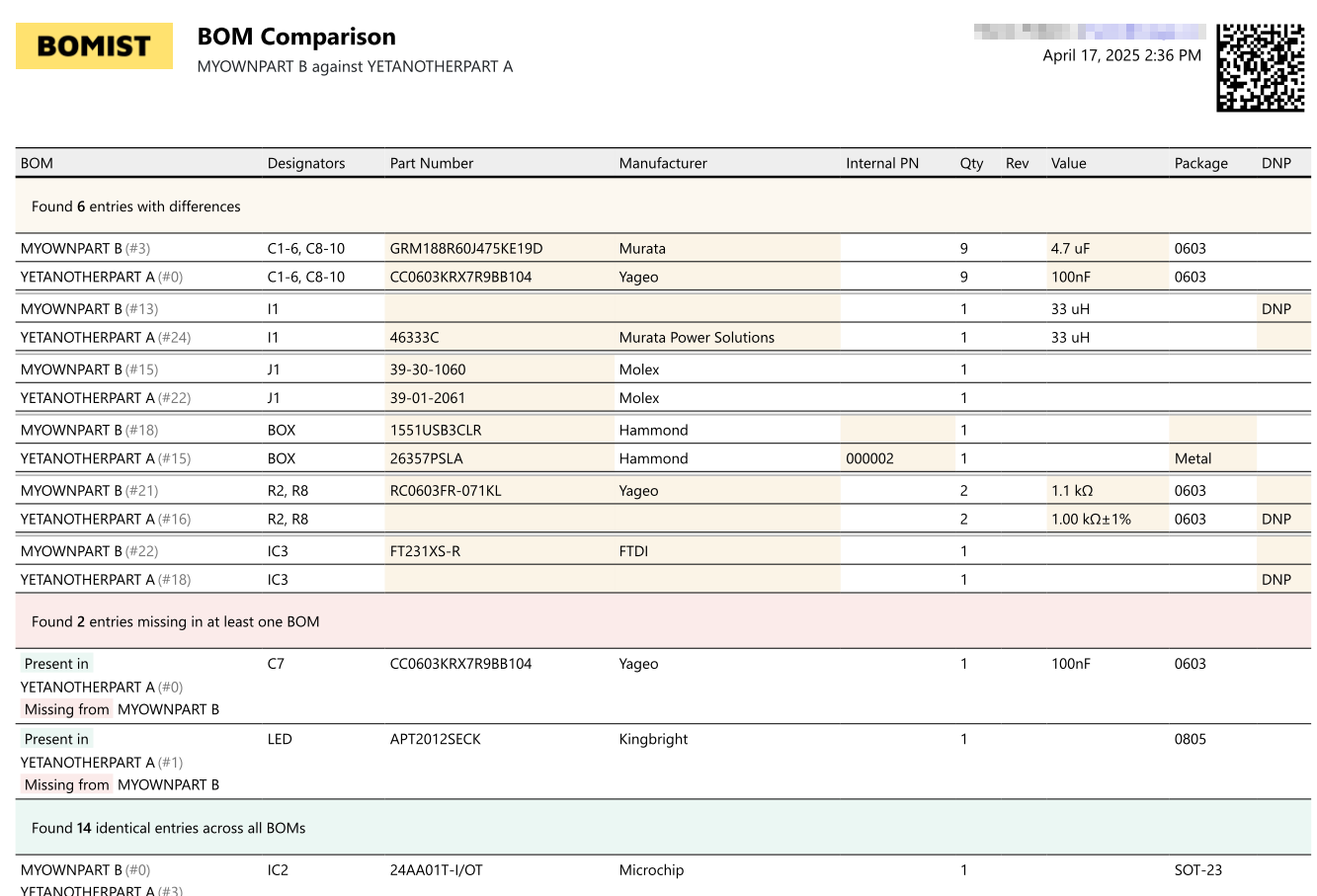
BOMIST's BOM comparison handles reference designator expansion, DNP-aware diffing, and multi-BOM views, giving your team a precise picture of what changed, what was added, and what was removed before any new revision goes to production.

A BOM Without Assembly Instructions Is a Production Liability
A Bill of Materials tells you what to build with. Assembly instructions tell you how to build it. Without both, you're handing assemblers an incomplete blueprint and hoping for the best.
What Is a Multi-Level BOM and How Do You Manage One?
Most real-world electronics products aren't a flat list of parts; they're hierarchies of sub-assemblies. Understanding multi-level BOMs is essential for accurate procurement and production planning.
How Poor Stock Visibility Causes Production Halts and How to Fix It
Running out of parts mid-production isn't just bad luck; it's a planning failure. Understanding allocated inventory and stock balance is what separates reactive teams from proactive ones.